For teachers

Run your soroban class inside the Kani Math app.

Create a class, share its code, and assign Levels skills and sprints that fit your class level. Students practice in the Kani Math app, and you see who finished, who is stuck and who led the week. Free to try for 3 months with up to 3 students.

teacher.kani-math.com

Assign, compete, review.

Three things the portal is built to make fast, so the time you spend on admin turns back into time you spend teaching.

Homework

Assign homework inside the app

Set your class’s level and the portal suggests that level’s skills and sprints. Assign them with a due date and they appear on every student’s Class page in the Kani Math app. Nothing to hand out, nothing to collect, and no email address standing between a child and their practice.

  • Skills from the app’s Levels, plus Math, Flash, Abacus and Column Sprint at the level and clock you choose
  • One passing run finishes each one, and homework never uses up a student’s free daily practice
  • Print a worksheet when paper is the right tool: five sheet types, set from the class level, each with its own answer key
  • Runs arrive as students finish, so you never chase anyone for a submission
Competitions

Turn any lesson into a contest

Open your class’s arena from the portal and put it on the projector. Students join from the Arena tab of the Kani Math app, you pick a skill or a sprint for each round, and everyone plays it at the same moment. Each round ends with a ranking and a winner.

  • Students join from the app’s Class page on any phone, tablet or computer, and appear on your screen as they arrive
  • Each round is one Levels skill on a 1, 2 or 3 minute clock, or one sprint level
  • The winner has the most correct answers, then the fewest mistakes, then the fastest time
  • Or run the competition paper — 200 questions in 8 minutes, categories A to I — when you are training for the real thing
Results

See exactly where each child stands

Open any student to see their class work and their progress in the app: each homework and whether it is done, their place on the Levels ladder, their sprint stars and their recent practice. The weak spot is usually visible in about ten seconds.

  • Per class: a leaderboard of homework finished and accuracy, with a Hero of the week and an all-time view
  • Per student: homework done, to do and past due, with their last homework run
  • Levels progress skill by skill, sprint stars by level and clock, and their streak
  • You walk into the next class already knowing who to sit next to

All three run in the browser on whatever device is already in the room. Nothing to install, for you or for the families.

Notifications

Students know the moment you assign

Assign homework or open a class arena, and every student in the class gets a notification on their phone or tablet, in the language they use the app in. No reminders to send, no group chat to chase.

  • Homework set between 9 pm and 7 am arrives at 7 am their time, so nobody is woken at night
  • An arena notification goes out at once, so the whole class can join within seconds
  • A tap opens their homework list or the arena, one step from playing

Notifications come with the free Android and iOS apps. Students who play in a browser find new homework on their Class page.

Show me how

Your class on Kani Math, step by step

Five steps from a free account to a live class arena. Every screen below is the real teacher portal and the real Kani Math app.

  1. You

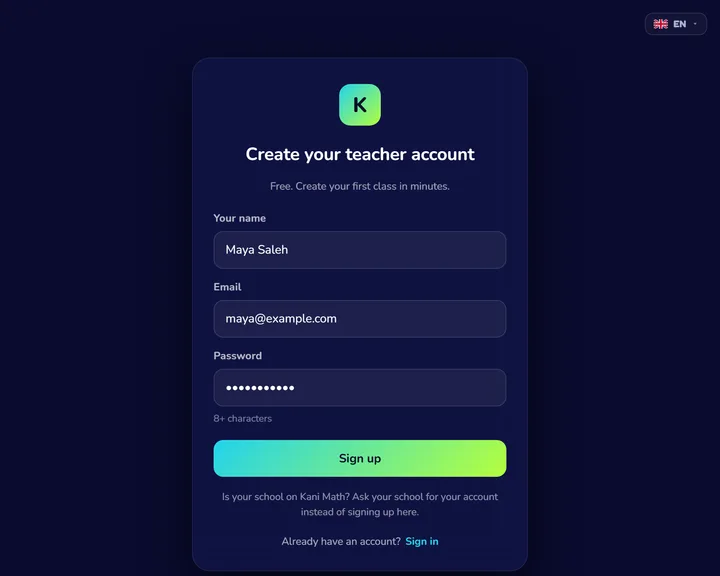
    Create your free account

    Sign up at teacher.kani-math.com with your name, email and a password. Your free account includes up to 3 students for 3 months, so you can try every feature with real learners.

    The teacher portal’s sign-up form, filled in with a name, an email and a password.
  2. You

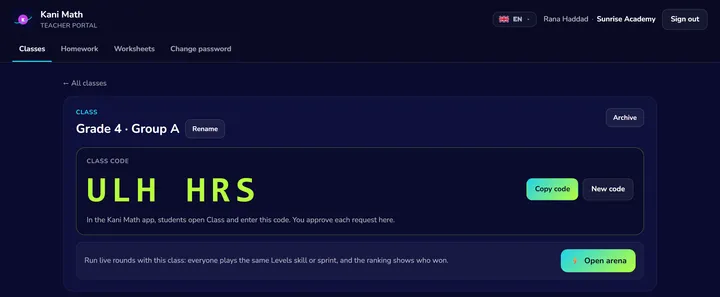
    Create a class, share the code

    One class per group, each with its own level and a six-character class code. Share the code in the class group chat, or write it on the board.

    A class page showing its six-character class code, with Copy code and New code.
  3. Students

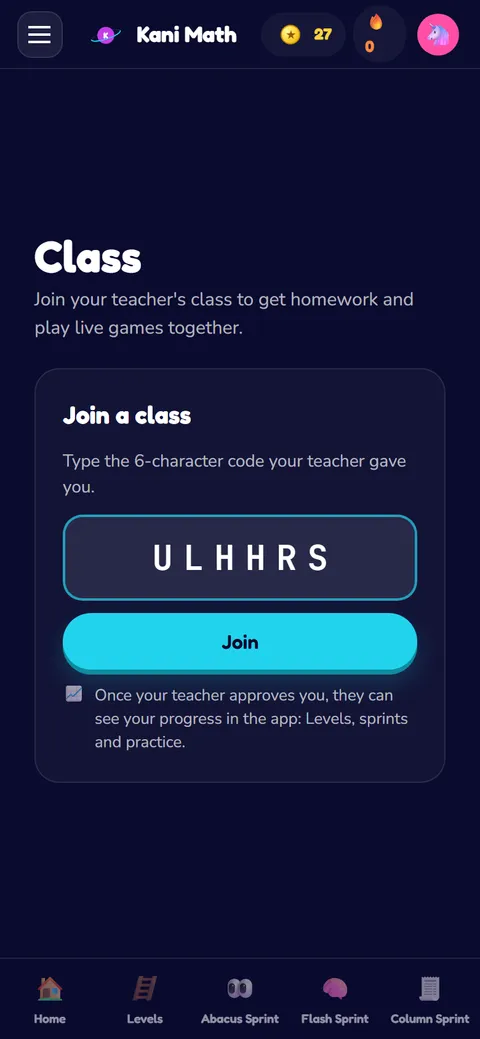
    Students join from the app

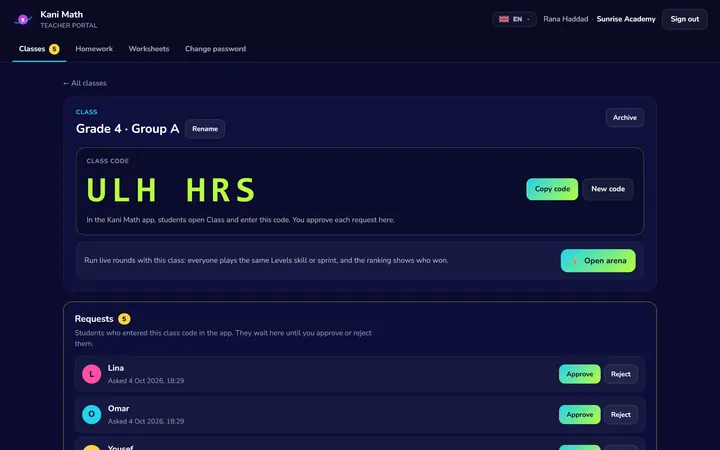
    Students type the code on the Class page of the Kani Math app, on a phone, tablet or computer. You approve each request, and no student email is ever needed.

    Five students waiting for the teacher to approve them, each with Approve and Reject.
    The Class page in the Kani Math app, with the class code typed in and the Join button.
  4. You

    Assign homework in a minute

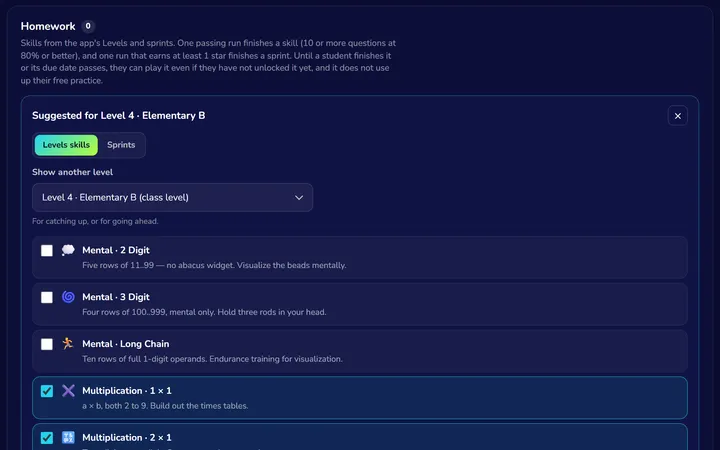
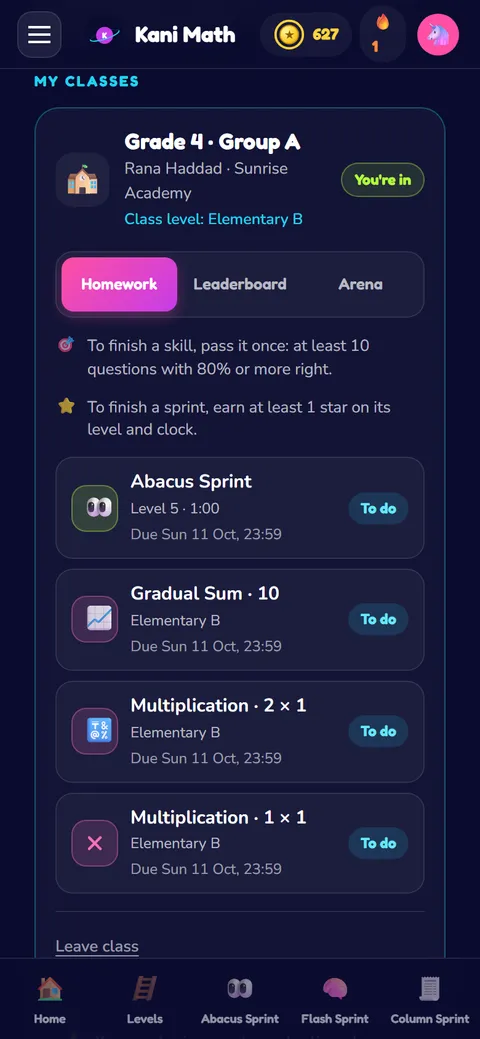
    Pick skills from the app’s Levels and timed sprints that fit the class level, and add a due date if you like. Students get a notification and see them straight away, and one passing run finishes each one.

    Assigning homework: the class level’s skills, three of them ticked.
    The student’s Homework tab in the app, listing the assigned skills and sprint.
  5. You & your students

    Follow progress, play live

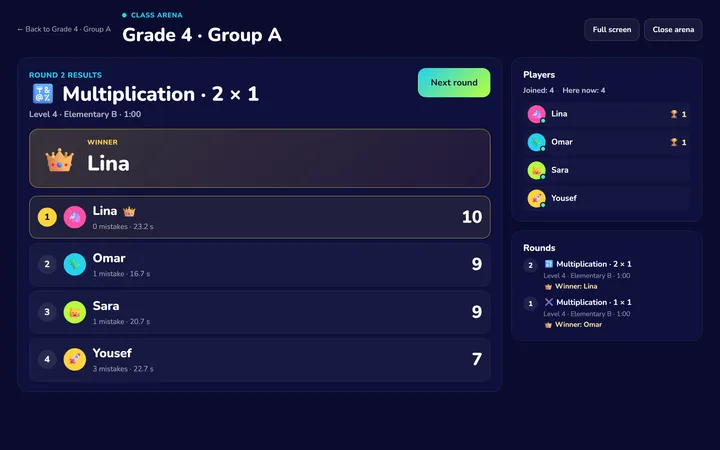
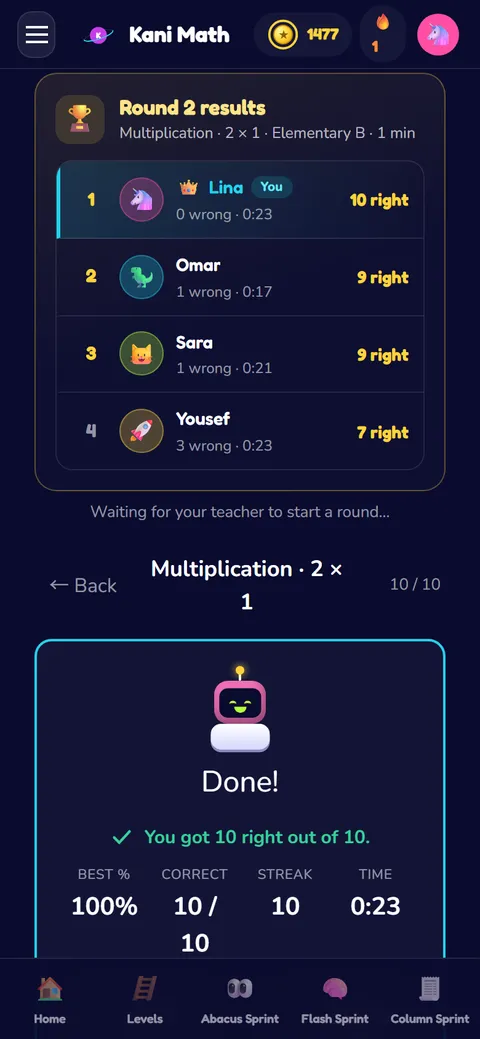
    See who finished, who is stuck and who led the week, and open any student for their full progress. Then turn a lesson into a class arena: everyone plays the same round, and the projector crowns the winner.

    A class arena on the projector: round results with the winner crowned and everyone’s score.
    The same round’s results on a student’s phone, with the winner at the top.

What else is in it.

🏅

Hero of the week

Students score for every homework they finish. The class leaderboard names a Hero of the week, starts fresh every Monday, and keeps an all-time record of everyone’s work.

🪜

Nine-level curriculum

Set each class on the same Foundation→Grand ladder the app uses, and the portal suggests that level’s skills and sprint levels as homework. The placement exam puts each new student on the right rung.

🖨️

Printable worksheets

Build column, bead-rule, multiplication, division or times-table sheets beside a live preview of the page. Pick a class level to set the difficulty, then print the worksheet and its answer key as two PDFs.

🌐

45 languages, RTL-aware

Students and parents use the app in all 45 languages, with right-to-left Arabic, Urdu, Persian and Central Kurdish built in, not retrofitted. The teacher portal is translated as well, with Arabic, French, Spanish, Portuguese and more.

Who this is for

  • Centre owners running soroban / mental-arithmetic classes
  • Independent teachers and tutors starting with a small group
  • School maths coordinators piloting an enrichment program
  • Homeschool co-ops where one parent leads a small group

Free for 3 months, plans for centers

Individual teachers get 3 months free with up to 3 students, so you can try every feature. Schools and centers get their own account, teacher logins on their email domain, student places to share between teachers, and full access for every student in their classes.

See center pricing →

Have a question we did not answer? A real human reads every contact-form message and replies within a few business days.

Running a school or center? Kani Math for institutions

Common questions

How many students can I teach for free?
An individual teacher account is free for 3 months with up to 3 students, so you can try every feature with real learners. For more students, a school or center account gives its teachers a pool of student places to share. A class arena seats every approved student in the class.
Do students need to install anything?
No. Students use the Kani Math app in any browser, or the free Android and iOS apps, which also notify them when you assign homework or open a class arena. They join your class from the app’s Class page with your class code, you approve each request, and no student email is ever needed.
Can I use this alongside my existing curriculum?
Yes. Many teachers keep their own lesson sequence and use Kani Math for practice volume between lessons. You choose which skills and sprints to assign, and the nine-level ladder is there if you want a full path, but nothing forces you onto it.
What does it cost for a center?
An individual teacher account is free for 3 months with up to 3 students. Center plans are priced by student places, with no setup fee, and every student in a center’s classes gets full access to the app. Contact us for a quote covering your student count.
Is it available in Arabic?
Yes. The student app ships 45 languages, all first-class, including right-to-left Arabic, Urdu, Persian and Central Kurdish. The teacher portal runs in Arabic too, along with French, Spanish, Portuguese and more. Number narration is delivered in English to every locale, a deliberate single-source choice.
See all questions →